How to Stop Checking Your Phone Without Deleting Apps
- Why You Keep Checking Your Phone
- When Phone Checking Becomes Automatic
- Why Deleting Apps Is Not the Only Solution
- How to Stop Checking Your Phone Without Deleting Apps
- Identify Your Biggest Phone-Checking Triggers
- Create Friction Between You and Your Phone
- Give Your Phone a Specific Place
- Turn Off Unnecessary Notifications
- Practice Leaving Your Phone Alone
- Replace Automatic Checking With Intentional Breaks
- Create Phone-Free Moments Instead of a Phone-Free Life
- Use a Simple Phone Boundary Routine
- Spotlight: Phone Block
- Frequently Asked Questions
- Final Thoughts
Why You Keep Checking Your Phone
You pick up your phone to check one thing.
A few minutes later, you are still looking at it. Maybe you opened a message. Then checked social media. Then looked at the weather. Then opened another app. Then returned to the first one.
It can feel like you are constantly checking your phone without actually deciding to do it. That is because phone checking can become an automatic behavior.
- A quiet moment appears.
- You feel bored.
- You finish a task.
- You feel uncomfortable.
- You hear a notification.
Your hand reaches for your phone. The behavior can happen before you consciously ask yourself whether you actually want to check anything.
The good news is that you do not necessarily need to delete every distracting app to change this pattern. You can start by changing the way you access your phone.
When Phone Checking Becomes Automatic
Habits become easier to repeat when the behavior is convenient. Your phone is usually:
- Nearby
- Easy to unlock
- Filled with familiar apps
- Constantly available
- Designed for quick interaction
That makes checking incredibly easy. You may not even notice how frequently you do it. The first step is simply becoming aware of the pattern.
Pay attention to when you reach for your phone. Is it when you are bored? During work? While watching television? During meals? Before bed? When you are waiting? When a difficult task feels uncomfortable?
Those moments reveal the cues behind the habit. Once you know the cue, you can change what happens next.
Why Deleting Apps Is Not the Only Solution
Deleting social media apps can help some people. But it is not the only strategy. You may still check:
- Messages
- News
- Shopping apps
- Weather
- Other websites
Even without social media, the habit of checking can remain. The deeper issue is often the automatic behavior itself.
You do not necessarily want to eliminate your phone. You want to stop feeling like you have to check it every few minutes. That requires a different goal: use your phone intentionally instead of automatically.
How to Stop Checking Your Phone Without Deleting Apps
You do not need to make your phone unusable. Instead, create moments where checking it requires a little more thought.
That can happen through simple changes:
- Move it farther away.
- Turn off unnecessary notifications.
- Create phone-free spaces.
- Set specific checking times.
- Use physical barriers.
- Replace checking with another activity.
The goal is to interrupt the automatic sequence. Instead of Pause → Check phone, create Pause → Notice the urge → Decide whether checking is necessary. That small pause can change the behavior.
Identify Your Biggest Phone-Checking Triggers
Before changing your habits, identify when they happen. For one day, pay attention to every time you automatically reach for your phone. You might discover patterns such as:
- Boredom: You have nothing to do for a few minutes.
- Stress: You want a quick distraction from something uncomfortable.
- Waiting: You are standing in line or waiting for someone.
- Work Transitions: You finish one task and check your phone before starting another.
- Evening Downtime: You sit down and immediately begin scrolling.
- Before Bed: Your phone becomes part of your nightly routine.
Once you know your triggers, you can create alternatives specifically for those situations.
Create Friction Between You and Your Phone
Automatic behaviors thrive when they are effortless. Make checking slightly less convenient. For example:
- Keep your phone across the room while working.
- Put it in a bag during meals.
- Leave it outside the bedroom.
- Turn the screen face down.
- Use Do Not Disturb.
- Keep it in a drawer during focused activities.
These changes create a small pause. That pause matters. You may reach for your phone, notice it is not immediately available, and realize: I do not actually need to check this. You have turned an automatic action into a conscious decision.
Give Your Phone a Specific Place
Instead of carrying your phone everywhere, give it a home. Your phone could stay:
- On a charging station.
- Inside a desk drawer.
- In your bag.
- On a shelf.
- In another room during focused work.
The exact location does not matter. Consistency does. When your phone always has a designated place, you are less likely to carry it from room to room simply because you might need it. You can still access it when necessary; you are simply creating more intentional boundaries around when it is physically with you.
Turn Off Unnecessary Notifications
Not every notification deserves immediate attention. Review your phone and decide which alerts are actually useful.
You may want to keep:
- Important calls
- Direct messages from specific people
- Calendar reminders
- Security alerts
- Other genuinely time-sensitive notifications
Consider turning off unnecessary alerts from:
- Shopping apps
- Games
- Promotional apps
- Social platforms
- News services
- Other apps that frequently interrupt you
The fewer unnecessary cues you receive, the fewer reasons your phone has to demand your attention.
Practice Leaving Your Phone Alone
You can also train yourself to tolerate short periods without checking. Start small: leave your phone alone for ten minutes, then fifteen, then thirty.
Try it during activities that normally trigger checking:
- Eat a meal without your phone.
- Read several pages without checking.
- Watch a movie without picking it up.
- Take a short walk without it.
- Sit outside.
The goal is not proving that you can survive without your phone; it is becoming comfortable with not responding to every impulse immediately.
Replace Automatic Checking With Intentional Breaks
Removing a habit is easier when you replace it with something else. If you normally check your phone during work breaks, try:
- Standing up and stretching
- Drinking water
- Looking outside or walking around
- Taking several slow breaths
- Writing down a thought
- Talking with someone nearby
The replacement does not need to be productive. It simply gives you another option. Eventually, a short break does not automatically have to mean opening your phone.
Create Phone-Free Moments Instead of a Phone-Free Life
You do not need to eliminate your phone to build healthier habits. Start with specific moments:
- Phone-Free Meals: Put your phone away while eating.
- Phone-Free Conversations: Keep your phone out of sight when spending time with someone.
- Phone-Free Focus Blocks: Put the device somewhere less accessible while working or studying.
- Phone-Free Mornings: Delay social media and unnecessary notifications after waking.
- Phone-Free Evenings: Create a period before bed when your phone is not part of your routine.
These boundaries are specific, making them easier to follow than a vague goal like "I need to use my phone less."
Use a Simple Phone Boundary Routine
Try this the next time you want to focus without checking your phone:
Decide exactly what you are going to do: read, work, eat, talk, study, or relax.
Decide how long you want to stay focused without checking. Start with 15 or 30 minutes.
Put your phone somewhere that requires a deliberate action to retrieve.
If you want to check it, notice the feeling. You do not have to act on it immediately.
Return your attention to what you were doing. After your focus period ends, decide intentionally whether you need your phone.
Repeat regularly. The goal is building a new response to the urge.
Spotlight: Phone Block
If your phone is physically close enough that you automatically glance at it, creating a small physical barrier can help.
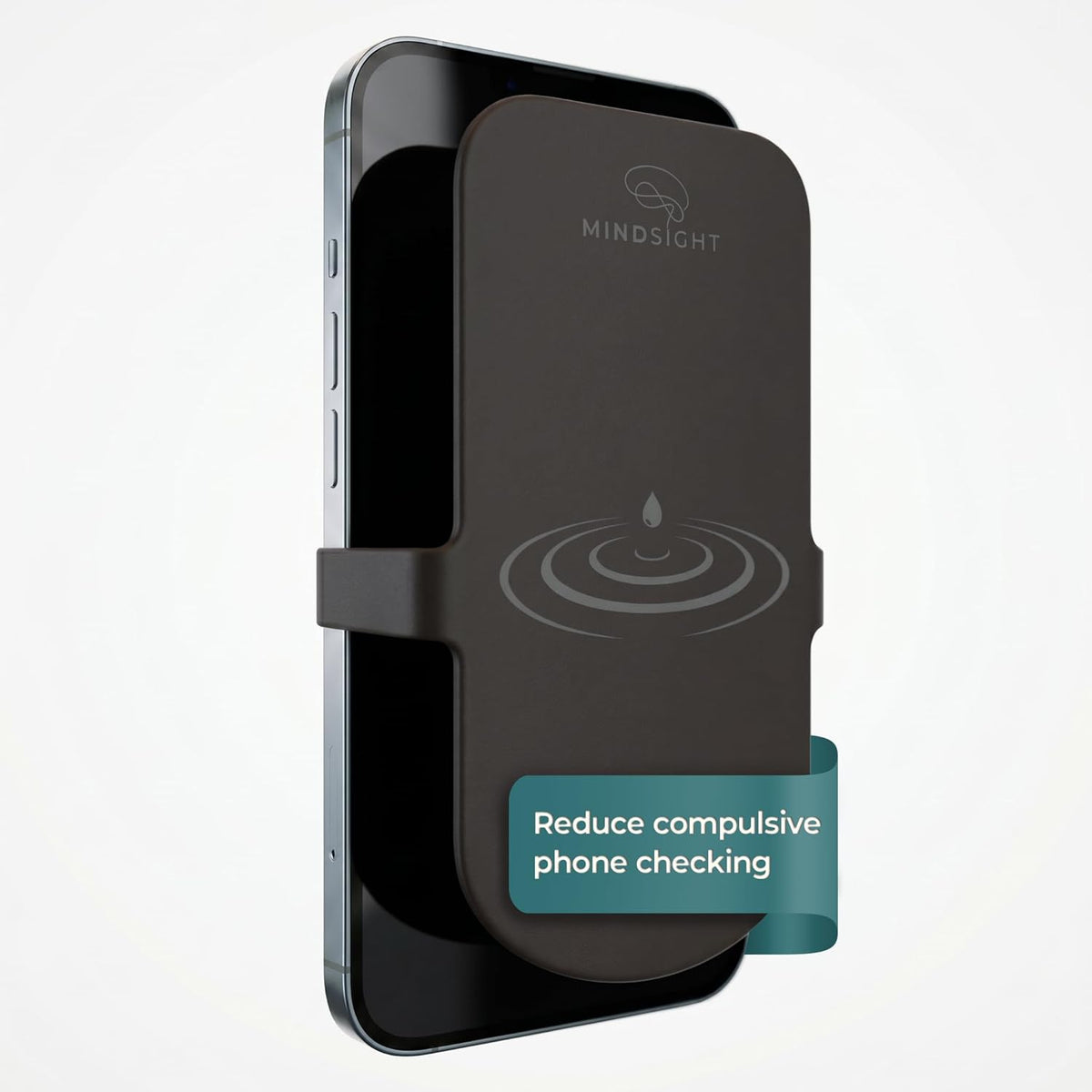
Phone Block by Mindsight is a silicone screen cover designed to add friction to phone checking while keeping the device accessible. It attaches with an elastic strap and can be put on or removed in seconds. It is intentionally not a full blackout cover, leaving a small border visible while making the screen less immediately inviting.
That makes Phone Block different from completely putting your phone away:
- You can still hear calls and notifications.
- You can still access your phone when you need it.
- The extra physical step creates a moment to pause before unlocking and checking.
Phone Block can be useful during:
- Meals & family time
- Conversations
- Work focus blocks & study sessions
- Watching a movie or reading
- Relaxing & time with children
- Situations where you want to be more present
The product is designed to be portable, so you can keep it in your pocket or bag and use it when you want additional friction around phone checking.
The idea is simple: You do not have to remove your favorite apps. You can change how automatically you access them.
Explore Phone Block →Frequently Asked Questions
How can I stop checking my phone so often?
Start by identifying when you check automatically. Then reduce unnecessary notifications, create phone-free periods, increase physical distance from the device, and replace checking with another activity.
Do I have to delete social media to stop checking my phone?
No. Deleting apps can be useful for some people, but you can also work on the habit itself by creating boundaries around when and how you access your phone.
Why do I check my phone without thinking?
Phone checking can become an automatic habit connected to cues such as boredom, stress, waiting, notifications, or transitions between activities.
How do I stop checking my phone while working?
Put your phone somewhere outside immediate reach, silence unnecessary notifications, and work in defined focus blocks. If you still find yourself reaching for it automatically, adding physical friction can create an additional pause.
What can I do instead of checking my phone?
Try stretching, walking, reading, drinking water, talking with someone, looking outside, writing something down, or simply allowing yourself to experience a quiet moment.
Can I use my phone less without going completely screen-free?
Yes. Intentional phone use does not require eliminating technology. Creating specific phone-free meals, conversations, focus sessions, and evening periods can be a practical starting point.
What is Phone Block?
Phone Block is a silicone screen cover from Mindsight that adds a small physical barrier to your phone screen. It is designed to interrupt automatic checking while keeping the phone accessible for calls and notifications.
Final Thoughts
You do not have to delete every app to change your relationship with your phone. You can start smaller:
- Notice when you check.
- Identify what triggers it.
- Turn off unnecessary notifications.
- Create phone-free moments.
- Move your phone farther away.
- Give yourself alternatives.
Most importantly, create a pause between the urge to check and the decision to do it. That pause gives you something valuable: Choice.
If you want a simple physical way to introduce that pause without completely hiding your phone, Phone Block by Mindsight is designed to add just enough friction to make checking more intentional while keeping the device accessible.
You do not need to stop using your phone. You simply need more moments when you decide whether to use it.